I have written about creating bootable USB disk using free software, but it is of no use if the motherboard or BIOS does not support USB booting, if you are stuck in a situation where BIOS does not support booting from USB or CD-ROM, free boot-manager PLoP would be the best solution for the problem, the easy to use boot manager can work with your existing boot-loader and even without the need to install on hard-disk.
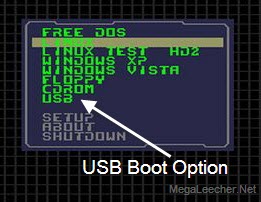
PLoP Boot Manager can launch from floppy, CD, network or existing boot manager like LILO, GRUB, Windows boot menu and DOS, once launched you can use PLoP to boot from USB and CD-ROM even if BIOS does not support these options.
To use PLoP from existing Windows Boot Manager on Windows 2K, XP and VISTA, Download PLoP Boot Manager and follow the procedure described inside the zip file or at the official website here.
Comments
Thanks
Good tip.
Nice tip !
You saved my day, thanks
Got the boot floppy
Got the boot floppy to work with Fedora 11 via usb boot :)
my
wonderful
i love you
first time visiter here at megaleecher
and I love you. this will help with my pII laptop, thanks.
You RuleZ
Thanks so much, this helps a lot on old machines
$rini
Nice work guys...........
Keep going!!!!!!!!!!!!!!!!!
Cool tim
Thanks for the cool tip I will try it out A.S.A.P
* Typo in title ^ * Cool Tip
Thanks for the cool tip I will try it out A.S.A.P
:D
:(|)
Thanks!
Got the boot floppy to work with Fedora 11 via usb boot :)
it supports oly for
it supports oly for ntfs
what to do for fat32
Format usb to ntfs, to make
Format usb to ntfs, to make usb bootable ( there is guide in google to do so) when your done just reformat your usb abck to fat32
Thanks.
Now can USB boot my PII.
Marvellous
Just FANTASTIC !!! thanx indeed
Awesome.....
u simply revitalized my machine.... :) thanks a lot..
how can i run plop without
how can i run plop without using loging in windows os,and cd rom
Very Nice
Very nice find... thanks for sharing!
Sadly, PLoP won't boot a USB
Sadly, PLoP won't boot a USB CD/DVD drive though.
Don't Work
this software don't work i have damage to cd but these option not show only black screen show then window open
This Is A Piece Of
This Is A Piece Of Crap
Whenever You Try To Boot Anything To Hangs With A Blinking underline
Whats An Alternative That Works?
Could I use this for my school project?
I've just stubled upon this site, could I just copy the technical articles from the site or do I need some kind of permission?. I'm writing a project for school.
James
THANKS HIGH MUCH
I say : thanks high much
for this great site and high appreciation for the job for every one in the world
I am grateful to you
I love you too
very sincerely yours
rahat khalid
from Pakistan with respect and love for you
Works like a Charm.
Works like a Charm. Installing new win with USB_CDROM within AHCI mode while my MB doesnt support USB in AHCI mode...
Not working for PIII
It is not able to boot from a USB drive, connected via a PCI USB card on a Tomato 810 motherboard.
Processor PIII.
May be it is due to the PCI card being uncompatible.
same drive works fine on my laptop while booting from it.
Plop says booting from USB and correctly detect HP v220 USB drive.
But no progress there on, I formated the drive with NTFS also still the same.
Trying to install OpenELEC on PIII, no cd iso available for this.
Will appreciate any help.
To YOU!
This is to all of you for which this isn't working!
YOU SUCK, you obviously know nothing about computers so suck it, I hope you have to pay a ridiculous amount to fix your pc because u are too stupid to work out how to use a simple bat file... idiots...
WTF are you talking about
What 'simple bat file' smart a**e?
Does not work for me
Using it with Pentium M motherboard and USB stick with DOS installed using Hewlett Packard utility I get this output:
LOADING EHC1 DRIVER
SEARCHING ON HOSTS
HOST 1
Then the PC hangs and I have to do a hard reboot
Holding down SHIFT when selecting the USB option gives this output:
LOADING UHC1 DRIVER
SEARCHING FOR HOSTS
HOST 1
PORT 2: DEVICE CONNECTED
NO HD
HOST 2
PORT 1: DEVICE CONNECTED
NO HD
PORT 2: DEVICE CONNECTED
NO HD
HOST 3
PORT 1: DEVICE CONNECTED
GENERIC USB SD READER
LOADING BOOT SECTOR...
Then the PC hangs. It appears that PLoP is confused by the presence of my 4 in 1 SD card reader. There are other boot loaders like GRUB that claim to boot from USB sticks, but I wonder if they will be affected by the card reader similarly.
using boot menu that's a
using boot menu that's a great trick to paas out bios setting
freedos freezes
On dell m1330 with latest bios all I get is black screen with text 'Freedos'. Tried many usb pen drives.
Freedos
You need to install a operating-system like Windows and Linux for graphical interface. Your laptop came with FreeDos command-line OS only.
"Burned" to usb pendrive the
"Burned" to usb pendrive the SeaTools for DOS cd image. Booting froze on dell m1330 and i didn't find solution. Tried on another computer. Worked there but not on dell.
Add new comment