Submitted by Deepesh Agarwal on Thu, 01/10/2008 - 09:46
Like me, if you are also annoyed with Adobe auto-updater popping up and freezing the application you can completely disable the feature in the latest version of Adobe Acrobat reader 8.1, just follow the steps below to disable Adobe updater:
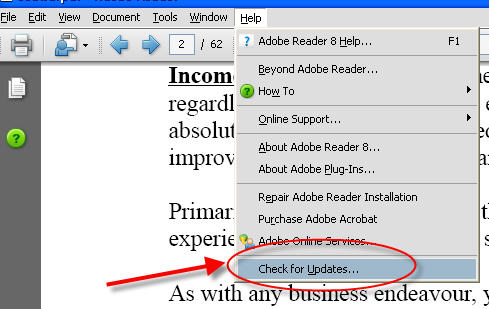
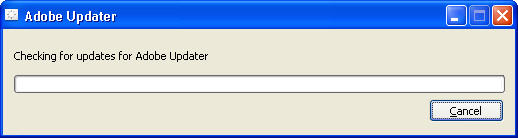
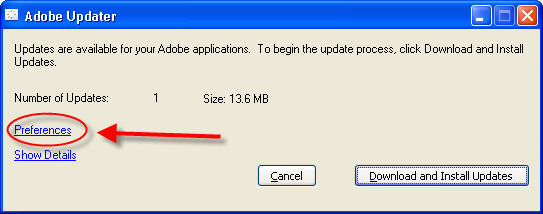
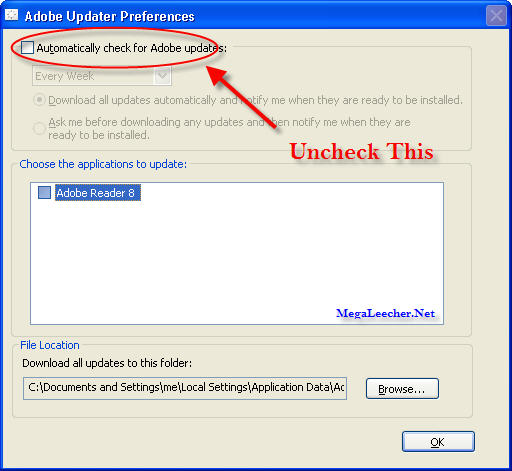
you need to check for updates at least one time in-order to access the Adobe Auto Updater preference dialog box.
Comments
thanks for this post
thanks for this post
The simplest and best way for Adobe CS5
This doesn't work for the Adobe CS5, so here is a simple way to deactivate it if you have CS5:
1. Open Windows dir:\Users\username\AppData\Local\Adobe\AAMUpdater\1.0\AdobeUpdaterPrefs.dat using Notepad.
2. Change the 3 tag to 0 and save. (it's about 3-4 lines down from the top)
3. Reboot and all is done!
Adobe CS5 changed it back
When I rebooted, the AdobeUpdaterPrefs.dat file was restored back to its original text with the 3 tag.
I repeated the steps and it was not restored the second time.
Maybe just my computer?
Adode Updater
When the "Adode Updater" Tray Icon appears, RUN task Manager and find "AdodeARM.EXE". Click on it and click Open File Location. In some installations, it "hides" in C:\Program Files (x86)\Common Files\Adobe\ARM\1.0 Rename all files. ex: "KILLED_AdoveARM.exe" Reset PC. That did it for me.
Not happening
Adobe Reader 7.0.7 update pane doesn't have the Preferences or even an 'update tick box to untck.
Update Adobe Acrobat to Version 8
You will need to have version 8 of the software to get this to work.
Thanks
Thanks, what an annoying feature...
Thanks
Really helpful. Thanks
go to edit, then preferences, and choose "updates" option
good luck
Thanks, this one worked great
Thanks, this one worked great for me. Cheers!
Awesome
That works great thanks!!
Thanks a Lot
This helped a lot, was trying to get rid of this S**T for a while now, n finally got it. Thanks 2 u.
No Internet Connection?
I'm running Acrobat Reader in a VMware that doesn't have a connection to the internet. After starting the Updater, it returns with a message saying
"No Internet connection was found. Please check your Internet setting or firewall."
And I only get an option to "Cancel" - no preferences button!
Is there any way to disable the update feature without internet access?
remove Updater.api from
remove Updater.api from C:\Program Files\Adobe\Acrobat 8.0\Acrobat\plug_ins
Then when you try to go to "Help | Check for update" nothing will happen :)
Thanks you Anonymous from
Thanks you Anonymous from Australia! Removing updater.api worked great for me!
thank you so much. it really
thank you so much.
it really worked.
remove Updater.api and Annots.api
Thanks! Easy and fast. " Annots.api " same error with same solution, and all run.
Yeees! Thank you very much!
Yeees! Thank you very much! Works with CS6 win7!
Thaanx man!!!!!!!
Thaanx man!!!!!!! cheers!!!!!!!!!
Thanx a lot!!!
Finally got rid of this anoying Adobe bs.
Version Adobe 7 - disable Adobe Reader Update Manager
Adobe used to be good software. So sad this is no longer true. So to get rid of that annoying update program, one option is to carefully edit the registry.
1. Choose Start > Run.
2. Type regedit in the Open text field, and then click OK to start the Windows Registry Editor.
3. In the Registry Editor, make a backup copy of the registry by choosing Registry > Export Registry File. In the Export Registry File dialog box, choose a location and type a name for the backup file, and then click Save.
4. Locate and select the HKEY_CURRENT_USER\Software\Microsoft\Windows\CurrentVersion\Run\ key.
5. Right-click on updateMgr, choose Delete and click Yes.
6. Restart your computer.
Cheers!
Disable Update for Acrobat 7
Thanks for the proposition, but:
Edit -> Preferences...
Remains simple.
Have a nice day.
Thanks!
Very useful! I really hate that malware-like updater
Sweet!
Worked just as posted; though I did have to stop and cancel a download that was already coming down. Once I did that, and then clicked "Check for Updates..." it was exactly as seen in this post.
Thanks!
It was the most annoying updater that I ever faced!
Because of this problem I switched to FoxitReader!
Thank You!
Finally there is a solution! Fuck that malware updater. I am so glad I don't have to close a stupid pop up every time I see it.
Looks like i just escaped disaster
I for a moment wanted to use adobe updater just for the bug fixes but after hearing about the updater disabling keygen/cracks and ruining your connection i just unchecked every box and ran away from it.
Thank you
Your post really helped me! Thank you!
--
Very Interesting
Thank you bros...
That's fine
It's done.Thank you.
I was annoyed by that cauz it converse much traffic from my adsl connection, that s**k!
Don't use acrobat
I have been using adobe products for over 13 years.
I use to love them, but lately the whole suite has become bloated and cumbersome.
I am always looking for alternatives and Foxit is a good Free alternative to Reader.
Foxit
Cheers
thank you i couldnt find the
thank you i couldnt find the way to get rid of it
Delete the updater folder from program files
go to :\Program Files\Common Files\Adobe
now here you will get a folder called updater
just delete this folder and you are done you need not to do any thing for this now it will not download any update automaticly
Removing updater.api works.
Removing updater.api file from plug_ins folder does not allow Adobe Reader to update itself.Thanks annonymous.
Thank you.
Thank you. From the bottom of my updater-annoyed heart.
THANK YOU
Thank you very much!!
Thanks man
This is a great helpful post, thanks!!!
THANK YOU !
I really needed this information ! thanks again !
Thank God.
At last i got rid off that sheit.
Many thanks.
Micke :-)
THANK YOU!
Nothing is more aggrivating than having your application interrupted while you are working on something important! I understand that they want their users to have the latest versions at all time but sometimes it just isn't the "right" time to update.. sometimes it isn't even the right time to ask me if it is OK to update. Ok.. now that I have vented my frustration, again, I'd like to thank the individual who shared that. Maybe now, I won't be so apprehensive about having adobe products on my machine.
THANK YOU!
Nothing is more aggrivating than having your application interrupted while you are working on something important! I understand that they want their users to have the latest versions at all time but sometimes it just isn't the "right" time to update.. sometimes it isn't even the right time to ask me if it is OK to update. Ok.. now that I have vented my frustration, again, I'd like to thank the individual who shared that. Maybe now, I won't be so apprehensive about having adobe products on my machine.
Thank You So Much!
This helps very much..
The're stealing my bandwith so much everytime i connect to the net, internet connections here in my country is quite expensive..
I really apreciate this...
1000 times thank you
What a ridiculous practice to put some preferences in one place and some in another - I drove myself crazy trying to find this in Edit>Preferences (where normal developers would place it). Thank you again!
What a crappy software it
What a crappy software it is. Sadly one has to use it for all those PDFs floating around
Thanks to all for suggesting fixes
No need to call home to disable
Adobe KB402251
Thank You
Hi ,
I am also able to disable the automatic update for adobe reader 7.0 . I just deleted the file updater.api from C:\Program Files\Adobe\Acrobat 7.0\Reader\plug_ins and it worked.
Regards,
S.Yuvaraj.
Thanks
THANKS for helping me REMOVE this major annoyance that Adobe sets to ACTIVE at installation.
Really helpful. Thanks This
Really helpful. Thanks
This is really a well laid out website. I like how you have presented your information with excellent detail. Keep up the great work here and please visit by my blog sometime. The url is
file4dwn.com
cheers jim coy, adobes a
cheers jim coy, adobes a bitch
Thanks
It was very helpfull
update pref in ver 8.1 works
thanks... cheers...
Works on Adobe Reader and Acrobat 9 Pro Extended
thanks... (^^,)
Cut that crappy company and its update strategy
Anyone figured out how Adobe manages to run their update software using Operating System resources(win) when the computer starts up?. They do not seem to understand that the most sensible time to run the updater is when the software or its component (Adobe reader) is opened or invoked. Who the hell gave them permission to run the updater when my computer starts up when I am not even thinking of using their 2 bit crappy piece of software.
I really hate when people run their software without my knowledge on my personal computer and I am really puzzled to see Adobe, a multi million dollar company keeps such an update strategy. There is no corresponding Adobe entry in the registry CurrentVersion\Run or even the startup folder to indicate windows start up entries running the updater software. Heck, then how the hell they manage to bring this crappy update software to foreground when the computer starts up ? Damn thing !
Sorry my post is running long, but another crap thing about Adobe, they do not let you change the flash player setting unless your computer is connected to internet !
I hate 'update found' notices that I didn't authorize
I suspect it's using active setup, a windows 'feature' which is now part of the OS. I'm a real non-fan of automatic stuff installing itself and running, someone please correct this if it's incorrect, but I think deleting the .api as earlier suggested, or even doing the dumb manual updater preferences settings would work ok in this case. The activesetup part will run when windows starts anyway, basically you would be disabling the adobe section of that.
It's amazing what you find
It's amazing what you find when you read their policies:
"The Software may automatically download and install updates from Adobe from time to time. These updates are designed to improve, enhance and further develop the Services and may take the form of bug fixes, enhanced functions, new Software modules and completely new versions. You agree to receive such updates (and permit Adobe to deliver these to you with or without your knowledge) as part of your use of the Services."
That last sentence is very disturbing...
thanx............... dude it
thanx............... dude it helped me a lot....
Adobe updates disable
Thank you so much, these update screens was driving me bonkers. And My website and programs would freeze up. I had Adobe Reader 9.1 an switched it back to Adobe 8.1. I Never had that many problems with the previous ADOBE. I have Windows xp Home edition. and I lost the ability to open my outlook express too , when I logged off cause I could not close down programs that were frozen up. I am glad its fixed. I like abobe when it works right. I disabled the updates. thanks.
Whoever wrote this guide, I
Whoever wrote this guide, I love you
Thank you!
To the author of this guide
God love you, bro
This Updater is the most annoying piece of shit I ever saw
This Updater is the most annoying piece of shit I ever saw. Running it on one PC is the *only* application we ever saw to clog our entire corporate's internet acces. And I can neither deinstall nor deactivate it in a standard manner. How impertinent!
Thank u
Thank u
Much Appreciation!!
Thank you for this post!! I went into the preferences thinking there would be a place to disable the updates. But there was not. I don't think I would have found it had it not been for this info. Adobe obviously wanted to embed it so the option would not be found. I am so fed up with the way so many SW companies are using so much deception. It is getting to where you don't know the good guys from the robbers anymore. I am so appreciative for people that take time out of their busy lives to help out others by doing something as simple as presenting a post like this. I want to send out a very big THANK YOU for whoever placed this info for all of us to use.
Warmest Regards
Mike H.
thanks a
thanks a lot!!!!!!!!!!
really annoying feature.... diabled at last... ;)
Also Works for Adobe Acrobat 9 Pro - Design Premium CS4
Many thanks for all ...
although its already eat 100 MB of my internet bandwidth in the background before i know it (_ _)"
kind regard
disable the Adobe Updater from running automatically
If you already have Adobe Reader installed and are looking for a simple way to disable the Updater from running automatically, run the following command from a Command Prompt. This will require admin access to the machine you are running this on, so if you are running Windows Vista you must use an elevated command prompt.
REG ADD "HKLM\SOFTWARE\Policies\Adobe\Acrobat Reader\8.0\FeatureLockdown" /v bUpdater /d 0 /t REG_DWORD /f
THANK YOU! this really
THANK YOU! this really helped with the annoying pop-ups about validating the downloads because I use vista and vista is control-freak like that (:
Thank You
Thank You;
Cheers,
Wakkawalla
Thanks
its nice trick !!!
Thanks a lot
thank you so much. it helps me a lot.
you can go to C:\Program
you can go to C:\Program Files\Common Files\Adobe\Updater5
and run AdobeUpdater and in pereferance disable autoupdate
awesome
Thanks a lot, the update fails every time anyway.
tnx
good one man
ps
tnx megaleecher for the twinky popup
Thank you very much! A
Thank you very much! A really annoying function...
Thank you
The update is really annoying, and doesn't work fine most of the times...
THanks
Thanks a ton , its one of the most annooying feature
THANK YOU sooooo much
THANK YOU sooooo much
thanks a lot man
i was trying for so long to turn it of ...so thank you
adobe - foke!
adobe - foke!
Sorted!
Spot on help topic, sooooo annoying, no longer!! Thank you xx
OUTSTANDING!
Simple solution. At least SOMEBODY is reading
the manual... Thanks...
At last I could disable the
At last I could disable the f**king acrobat updates. I dont like any software doing any downloading without user's permission.
Thank you very much :)
Thank you very much :)
Good solution.... But can be
Good solution....
But can be used if and only if the Updates are available in case of Adobe9.
If ur Adobe is up to date u wont find Preferences option...
So for that access "Edit" menu and select option "Preferences"...
Select "Updater" from Categories panel.. and select radio button "Do not Download or install updates automatically"
Thanks
Cheers
acrobat reader v9
acrobat reader v9 C:\Archivos de programa\Adobe\Reader 9.0\Reader\plug_ins
Adobe Reader 8.2.0
In my version of Reader, I had to go through the Edit menu and choose Preferences. There, choose Updater and click on "Do not automatically donwload or install updates". Apparently, it will download software and awaiting for approval to install by default.
hey... thanks..
hey...
thanks..
thx u
thx u
Ok.. let me tell you.. im
Ok.. let me tell you.. im incredibly annoyed
by this program.. for that automatic update.
that kicks in.. when u less expect it.
was thinking in installing a very old version
of the program just to avoid that ..
imho this should be classified as malware or spamware
in every antivirus program and disable it..
many thanks for the solution..
FAK this faking adobe
FAK this faking adobe updater
thanks!
Why bother ??? !!!
Why bother trying to configure this sucker ???
Log in as Administrator, go to Progra Files -> Common Files -> Adobe and delete foders Updater and ARM (ARM is not that simple to delete - you'll have delete those files one by one). And you'll never see those annoying icons popping up again.
BTW I wonder why people just go on and on moaning and whining about evil Microsoft (not that I love MS, but...) ??? Look at these Adobe nerve wrecking crappy pop-ups ... is Adobe any better than MS ??? My answer is NO - they're all the same out there, just to get your money and screw you and to make you stay with their SW - updating and updating and updating their crap
Thanks! :D
Thanks! :D
bril change thanks alot
bril change thanks alot
a better way
If you delete the file and at some point decide to update adobe will reinstall the file. A more perminate way to stop this is simple.
Go to start, run.
Type
gpedit.msc
Your local group policy will open. In the computer configuration tree, expand "windows settings"
then expand "security settings" / "software restriction policies".
Select the "Addtional Rules" folder. In the right side box, right click and choose "New Path Rule". A new dialog box will open which will allow you to browse to any file you want. Browse to any of the files mentioned here, depending on the version you have. Make sure the disallow drop down is picked in the dialog box. Click Apply, then ok.
That's it, no matter what adobe does, the file will never be permitted to run on your system again. This can also be done with the adobeARM.EXE which will run in the start up of your system. You may also want to look in this location for all the updater files and place the path rule on each of them.
c:\program_files\common_files\adobe\1.0\***.exe
Again this is a surefire way that will not hurt your computer in anyway. It also works on any file you never want to have run. IE MS Messenger with some of the MS programs. If your not super tech savy I would recommend staying way from the regedit as you can mess up your system if you delete the wrong key. This method will not mess up anything. The file will try to run in the backround and the policy will not allow it. You wont get any popups, warnings etc. Hope this helps you all out.
Mate, you are a bloody legend
Mate, you are a bloody legend. This is one of the best solutions I found on the Internet, kudos to you my friend
Uninstall and use other software! Non-updated software is danger
Adobe software is the primary attack target for hackers/crackers - it will automatically install Viruses/Trojans if you use out of date Flash/Reader/...!
If you see pdf files directly in your browser, every website could install Software without your knowledge!
If you want a quick&slim reader use the open-source software Sumatrapdf
If you need a reader with all features use e.g. PDF-XChange Viewer (free Version).
And uninstall the Reader now!
Please always use a Virus scanner, if possible a payed one! E.G. NOD32!
Adobe Photoshop Window 7 - Disable Adobe Update
"Adobe updater is really fast moving target. It sounds extreme, but if above steps do not work for you and Adobe CS apps like Photoshop CS4 or Flash CS4 demand updates frequently than look for the AdobeESDGlobalApps.xml file in the \ProgramData\Adobe\Updater6 folder and open it with an XML or text editor.
Check out the IsEnabled = 1 settings in the application XML node you do not want to have on the updater’s list. Set to 0 to disable it. You may need administrator privilages to save the changes."
+1 for this
+1 for this
This annoyance had me going
This annoyance had me going berserk. Thanks a ton!
1000 thanks
Many thanks for your post!
Here it is for CS5! Best
Here it is for CS5! Best explanation by Adobe himself ....
http://kb2.adobe.com/cps/850/cpsid_85016.html
ThanQ
Thanks for the solution. It worked fine.
DISABLE UPDATER IN 2011
see image how to disable updater in 2011 year
http://i1182.photobucket.com/albums/x452/Zviadi1/for%20temp%20stuff/disableadobeupdaterin2011.jpg
good luck :))
tags: disable adobe updater 2011
Remove the Updater.api
> remove Updater.api from C:\Program Files\Adobe\Acrobat 8.0\Acrobat\plug_ins
Sweet! Thanks a lot for that one.
Literally years of annoyance are
finally over. ;)
To get rid of Acrobat 8 or 9
To get rid of Acrobat 8 or 9 updater calling home, add
127.0.0.1 armmf.adobe.com
127.0.0.1 ereg.adobe.com
to your hosts file which is located in c:\windows\system32\drivers\etc folder
hope this helps
Acrobat 10 x pro
just delete this in the installed directory "adobe_upgrade.dll".
There would be no further serial number checking.
Acrobat v.9.0.0
1.
>Open Adobe Reader
>Click "Ctrl+K"
>Click "Generals"
>Uncheck "Check for updates"
2.
>Open "\Program Files\Adobe\Reader 9.0\Reader"
Remove "AdobeUpdater.dll"
3.
>Open "\Program Files\Adobe\Reader 9.0\Reader\plug_ins"
>Remove "updater.exe"
4.
>Open "\Program Files\Common Files\Adobe\"
>Remove "Updater6" Folder
Final solution
Adobe changes their settings in every version or updates, hence most of the solutions here won't work.
Here's the final solution for this problem:
1. Go to Control Panel -> Add/Remove Programs
2. Uninstall Adobe Reader
3. Goto www.foxitsoftware.com/downloads and download the FREE PDF reader.
It's faster, more features, no annoyances and works better than the Adobe Reader itself!!
Try it and you will thank me for it.
Yes, Foxit sounds like a good
Yes, Foxit sounds like a good alternative to Adobe, but it is ONLY for Windows, so Mac users like myself are SOL.
For Mac users, Preview does
For Mac users, Preview does everything Reader does. No need for it at all.
adobe exe pops up in WPE
I have Reader 8.2 and also use SysInternal's original Windows Process Explorer.
I see an entry under an svchost.exe that keeps popping up. I can close it, but it will re-appear minutes later.
AcroRd32Info.exe Adobe Reader 8.2
It will self close after 10 seconds or so, and come back again and again.
My 8.2 preferences has updates disabled. There is no entry in the above thread mentioned registry area (i.e. Run)
Really want it to go away. I don't feel safe when I have no control over my box.
Running XP SP2
sara dot j at embarqmail dot com
Thanks in advance.
There is a tool for that
Check UpdateFreezer. It will help to control this (http://www.megaleecher.net/taxonomy/term/12926)
For disabling ReaderX updates
For disabling ReaderX updates following registry entry can be created: [HKEY_LOCAL_MACHINE\SOFTWARE\Policies\Adobe\Acrobat Reader\10.0\FeatureLockDown]
Keep this damn adobe flash
Keep this damn adobe flash from coming up everytime I try to get on
my computer. Thanks. It is very annoying
thanks i finally got that
thanks i finally got that annoying pop up to stop popping up goodness gracious
Maybe this will work - remove Acrobat
Damn Adobe
Hi
Thank you it worked for me very good
Add new comment