Submitted by Deepesh Agarwal on Sun, 02/17/2008 - 14:23
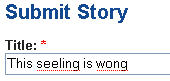 By default Firefox's in-line spell checker does not work in all text-boxes and forms and you need to right-click and select “Spell check this field” to manually start spell-check, however this behavior can be automatically activated by following the steps provided below.
- Type about:config in your Firefox address bar and press Enter.
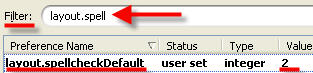
- Type layout.spell in filter text box.
- Change the value to 2 as shown below.
Comments
hi
hiiiiiiiiiiiii
^_^
Thanks! This sure helps a lot. *hugs*
Spellcheck
Great tip i need that as my spelling is a bit suspect! at times cheers Mike.
Add new comment