Submitted by Deepesh Agarwal on Sat, 05/03/2008 - 12:06
 Ashampoo Magical Defrag is a well known hard-disk defragmentation utility, Once installed the software defragments the hard-disk in background without interfering normal working of the computer.
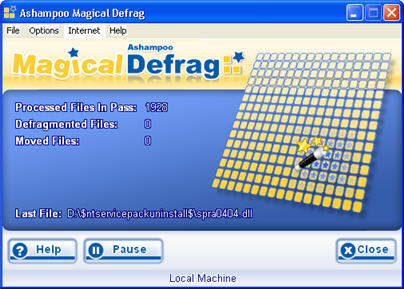
Features:
- Stops automatically as soon as other programs need processor capacity or access the hard disk.
- Install & forget: Once it's installed the program runs in the background as a service and keeps your hard disk tidy automatically.
- Even defragments when no users are logged in.
To get the special promotional free full version from VNU Computeractive, simply follow the instructions below:
- Download the full version installer from this link.
- Launch installer, During installation, make sure Get fullversion key is ticked.
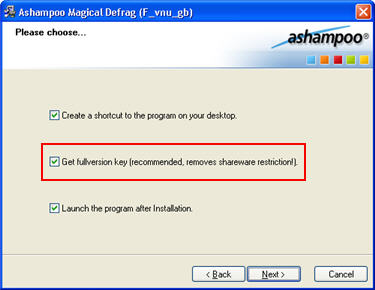
- After installation the Full version registration page should launch, fill in the details and the key will be emailed to you.

Comments
Thanks for the post! But I
Thanks for the post!
But I find it a bit silly - why go through all the trouble if you can download a free defrag, for example Auslogics DiskDefrag works really well, it's free and easy to download. And all this tick here - tick there - get license key business is sort of pointless in this case.
Free Defrag Software
You don't even need Auslogics DiskDefrag, as inbuilt windows defrag does the same thing, the point is the software is getting sold for MONEY and you are getting it free using the method above :), I personally use windows default defrag software.
I use this program sins
I use this program since about 4 year on another PC!!!
By far the best defragmenter I've used
Unlike Auslogic and the Windows defragmenters, AMD doesn't require you to ever defragment, it just runs in the background defragmenting when the computer isn't doing anything else.
I've checked it's efficiency by running Norton's defragmenter and there is never anything needing defragmented.
It's one of the best programs I've ever installed.
magical defrag
Jà tinha usado a versão trial e tinha gostado muito, agora de graça é melhor ainda.
ashampoo magical defrag 3
pls serial key ashampoo magical defrag 3
gooddddddd
gooddddddd
Add new comment