Submitted by Deepesh Agarwal on Tue, 06/10/2008 - 08:30
At times you may need to get hold of full email headers of an email, usually most email services provide easy methods to view them but Gmail is a bit tricky and finding the right option is not very intuitive, to view full email headers use the method described below:
- Open the email from your Gmail account.
- Use the reply drop-down menu to access "Show Original" as shown below.
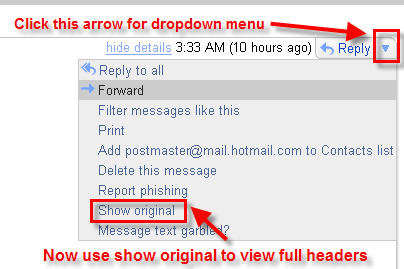
- A new window with full email headers will launch.

Comments
Great
Now i can trace these spammers with http://www.ip-adress.com
The header now works. Thank you.
But u cant get mailer ip
Jai Hind
u can track mailer ip in yahoo but u cant get mailer ip in Gmail they are hiding all senders ip may be behind Squid or something else...in recieved section u will see their those server not urs ips
i testes this by sending test mail to myself from gamil and also from other mail providers
Wow…nice tips. I have
Wow…nice tips. I have accounts in yahoo, live and gmail. But I use my live account most. Few days ago my friend who uses Gmail told me about this problem. I didn’t get it as I never had to view the full email header. When I tried to do that in my live account it seems quite easy. I’m going to tell my friend about this tip right now. Thanks a lot.
Add new comment