Submitted by Deepesh Agarwal on Thu, 01/17/2008 - 15:02
Both Windows Vista and XP supports multiple user accounts and prompt for login each time computer starts, this can get annoying and time-waster if you are the only user of the computer and do not want to get prompted for password or welcome screen, to get windows to autologin into your user account follow the steps as below:
For Windows Vista:
- Click Start
- Type netplwiz in the search-box and press enter.
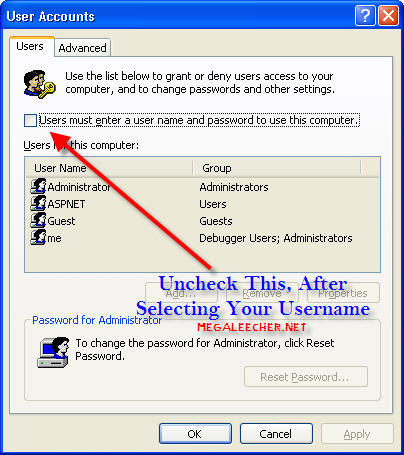
- Select the user you want to auto-login automatically and then uncheck the box reading “Users must enter a username and password to use this computer”.
- Enter your password when prompted leave empty if none.
- Click OK.
For Windows XP:
- Press Windows Key + R (or Goto Start-> Run).
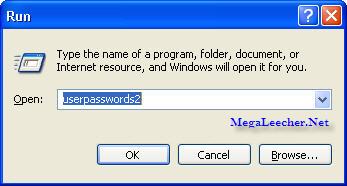
- Type control userpasswords2 and press enter in RUN dialog box.
- Click the username you want to autologin and uncheck the box “Users must enter a username and password to use this computer”.
- Enter your password when prompted leave empty if none.
- Click OK.
UPDATE: You can also use the AutoLogin utility provided by Sysinternals (now owned by Microsoft) to make the necessary changes to the registry.
Comments
tahnk you,i'll
tahnk you,i'll try
+8801672559993
does not work
cant find userpasswords2 in windows xp sp3, this command does work in Vista, so guess you mistaken... to bad
re: Does not work
Actually you are mistaken. The instructions aren't 100% clear but it does work. You have to enter this in the dialog box: control userpasswords2
userpasswords2
He gave two different instructions...one for Vista, and one for XP. The userpasswords2 is for XP. The one for Vista is above it (netplwiz) and it DOES work.
don't work for me
Tried copy and pasting userpasswords2 into run command.
Didn't work could not be found.
I have windows XP SP2
WinXP
You need to type "control userpasswords2" for Windows XP. Cheers
Thanks, formatting mistake...
I mistakenly made the userpasswords2 bold and left control as it is from the full command "control userpasswords2", resulting in trick not working for users, thanks for pointing out.
Does Not Auto Log You In
This does not work. I unchecked the "user must enter a username and password..." box. Now when I boot, it says invalid password and an extra log-in icon is there. All this did was make the log-in problem worse.
Thanks
im making a jukebox and i am using novell client for windows to connect to my netware server and now i don't have to enter any passwords when the system boots!
Thanks
Good advice... helped with the new Eee
thanks
hey,,it's working in windows 7 too..
thanks a lot ....
for windows 7,,,cmd is (control userpasswords2)
wanna know
if it allows remotely log in as if it does , it will add lake to my security
or does it works for local log in only
Wishing
Thank you for your Post @
Autologin Into Windows XP And Vista Without Entering Password
Hi there, this weekend is nice in support of me, for the reason that
this time i am reading this impressive educational article here at my home.
doesnt work
this doesnt work silly scam
Autologin Into Windows XP And Vista Without Entering Password
you spin my cheese right round when ya go down down down down
without giving password without autologin
sent your opinion
cheers mate worked fine
cheers mate worked fine
for XP sp3 users
for Win XP sp3 type in Run [control userpasswords2], it's worked well,don't miss the space between control and userpasswords2 .
its works
for xp3 use " control userpasswords2 "
thanx 4 trick
Login to Admin Account
I want to login as a administator or get admininistrator rights in user account without change or remove admininistrator password.
When i type in run in xp "control userpassword2" it shows
"To continue type user name and password of administrator"
Please resolve this problem.
Thanks
Add new comment