Submitted by Deepesh Agarwal on Tue, 04/15/2008 - 06:53
Windows Safe Mode is a special troubleshooting mode for Windows OS loading only core system services and files, the most used method to boot into safe mode is to keep pressing F8 key after starting the computer, another easy way to boot into safe mode would be to use MSCONFIG booting options.
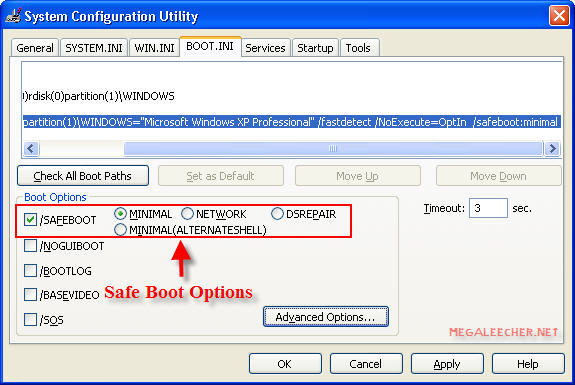
- Goto Start -> Run and Type MSCONFIG, Press Enter.
- Select BOOT.INI tab.
- Check the /SAFEBOOT option as shown above.
To know more about various safe boot options visit this Microsoft KB Article.
Comments
Thanks to this method, it's
Thanks to this method, it's gotten me out of sticky situations MANY times, when the F8 thing failed me for a few months. not sure why. probably spyware. anyhoo.
and guys, unless you wanna keep booting into safe mode, make sure to change it back BEFORE you restart. just uncheck the /safeboot when you're done doing what you need to do in safe mode.
Add new comment